
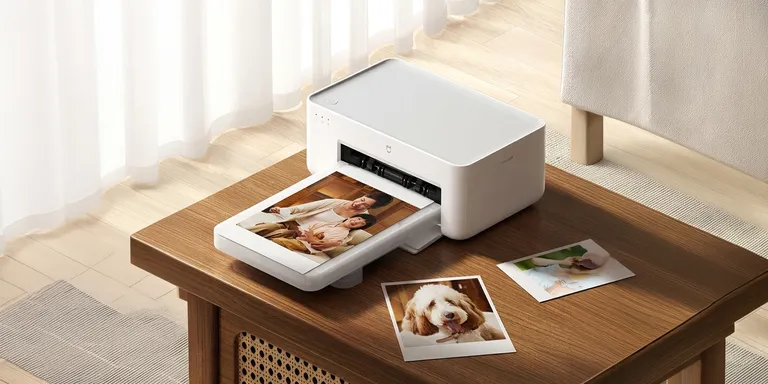
The Xiaomi Mijia Desktop Photo Printer 2 marks a genuine leap forward in compact photo printing — built around professional-grade dye-sublimation technology that most people don’t expect to find at this price point. Families, photography enthusiasts, students, small business owners — this thing was designed with all of them in mind. It packs 4-color dye-sublimation printing, wireless connectivity, automatic lamination, and high-resolution output into a footprint small enough to sit on a nightstand.
Table of Contents
ToggleThis guide breaks down everything worth knowing: the technology behind it, full specifications, standout features, print quality, connectivity, what it does well, where it falls short, and who’ll actually get the most from it.
Overview of Xiaomi Mijia Desktop Photo Printer 2
| Feature | Details |
|---|---|
| Printing Technology | 4-Color Dye Sublimation |
| Print Resolution | Up to 300 dpi |
| Print Finish | Automatic Protective Lamination |
| Connectivity | Wi-Fi |
| Mobile Support | Android & iOS |
| Paper Sizes | Standard Photo Paper |
| Color System | Cyan, Magenta, Yellow, Protective Layer |
| Smart Printing | Xiaomi Home App Integration |
| Intended Users | Home, Students, Families, Small Offices |
At its core, the printer’s job is straightforward — deliver vivid photographs that actually last, without bleeding your wallet dry on operating costs.
What Is 4-Color Dye Sublimation Printing?
Here’s something worth understanding before anything else. Dye-sublimation printers don’t spray liquid ink onto paper the way inkjets do. Instead, they use heat to push dye directly into specially coated photo paper. The difference in results? Night and day.
The process runs through multiple passes:
- Yellow layer
- Magenta layer
- Cyan layer
- Protective transparent coating
No visible ink droplets. Instead, millions of color gradients melt together seamlessly — producing output that looks and feels continuous, not mechanical.
What you actually get:
- Continuous-tone photographs
- Extremely smooth skin tones
- Rich shadows
- Vibrant highlights
- Water-resistant photos
- Fingerprint-resistant prints
How Dye Sublimation Printing Works
Each color layer gets heated to a precisely different temperature. That precision is what drives accurate color reproduction. It’s not magic — it’s controlled thermodynamics.
Premium Print Quality
Honestly, this is where the Mijia Desktop Photo Printer 2 earns its reputation. The image quality is consistent in a way that cheaper printers simply aren’t.
Output characteristics include:
- Smooth color transitions
- High dynamic range
- Sharp detail retention
- Natural skin tones
- Excellent color accuracy
- Glossy professional finish
Because the dye penetrates the paper rather than sitting on top of it, the prints look like they came out of a photo lab. Not “almost like a photo lab.” Actually, like one.
Automatic Lamination Protection
Once the image prints, the printer doesn’t stop there. It lays down a transparent protective coating over the entire surface.
That coating defends against:
- Water
- Humidity
- Fingerprints
- UV fading
- Dust
- Scratches
Under normal storage conditions, photos stay vibrant for years. That’s not marketing language — that’s just what laminated dye-sub prints do.
Compact Modern Design
Xiaomi built this with minimalism as the guiding principle. No unnecessary bulk. No cluttered aesthetic.
Design highlights:
- Small desktop footprint
- Rounded corners
- Quiet operation
- Lightweight body
- Modern white finish
And because of that compact form, it fits comfortably in:
- Bedrooms
- Home offices
- College dorms
- Living rooms
- Retail counters
Wireless Printing Experience
No USB cables. No hunting for drivers. The printer connects wirelessly, and users can send photos directly from wherever they’re standing.
Supported methods:
- Wi-Fi
- Xiaomi Home App
- Mobile devices
- Tablets
Snap a photo, open the app, hit print. It’s genuinely that fast.
Xiaomi Home App Integration
The Xiaomi Home ecosystem does a lot of the heavy lifting here. The app’s not just a print button — it’s a proper editing environment.
From inside the app, users can:
- Select images
- Edit photos
- Crop
- Rotate
- Add borders
- Apply filters
- Build collages
- Print instantly
The interface stays simple enough that anyone can figure it out quickly. But there’s enough depth for users who want to get creative.
High Color Accuracy
Four passes. Millions of reproducible colors. The dye-sublimation process doesn’t approximate color — it nails it.
Real-world benefits:
- Better landscape rendering
- More realistic portraits
- Improved sunset tones
- Rich blue skies
- Natural greens
- Smooth grayscale transitions
Professional photographers printing personal memories especially notice this. Consistency matters when you care about how the final image looks on paper.
Fast Printing Performance
The printer handles everything automatically — no manual steps between capture and finished photo.
The complete workflow:
- Image processing
- Color transfer
- Protective coating application
- Final photo ejection
Is it slower than printing a Word document? Yes. But that’s not really the comparison that matters. The question is whether the quality justifies the time — and it does, without much argument.
Quiet Operation
The internal mechanics keep noise levels low. Low enough that this printer doesn’t feel out of place in:
- Libraries
- Offices
- Homes
- Classrooms
Print a photo in a quiet room, and nobody’s going to look up from what they’re doing.
Supported Photo Applications
The range of practical use cases is wider than it might seem at first glance:
- Passport photos
- Family albums
- Wedding memories
- Birthday pictures
- Graduation photos
- Holiday snapshots
- Scrapbooks
- DIY greeting cards
- Photo journals
- Decorative wall photos
Excellent Color Gradation
Traditional inkjet printers — even decent ones — show individual ink dots under close inspection. Dye sublimation doesn’t have that problem.
The result is genuinely continuous gradients across the entire image.
Advantages:
- No banding
- No graininess
- Better skin texture
- Improved portrait rendering
- Soft color transitions
Photographs end up looking natural. Not processed. Not printed. Natural.
Durability of Printed Photos
The protective overcoat isn’t decorative — it’s functional. Prints come out resistant to:
- Moisture
- Light scratches
- Smudging
- Regular everyday handling
Store them properly, and they’ll look the same years from now as they did the day they were printed.
Mobile Printing Convenience
Most people’s photos live on their phones now. That’s just reality. And this printer doesn’t fight that — it works with it.
Typical workflow:
- Capture image
- Open Xiaomi Home
- Select printer
- Edit photo
The whole thing takes a few minutes, start to finish.
Ideal Users
Families — Print the moments worth keeping. Albums, wall frames, memory boxes.
Students — Project materials, ID photos, personalized gifts. All viable.
Travelers — Turn vacation shots into physical keepsakes rather than files collecting dust on a hard drive.
Creative Users — Greeting cards, journals, scrapbooks. The laminated finish holds up to handling.
Small Businesses — Instant customer photography and promotional print materials without outsourcing.
Advantages of Dye Sublimation Over Inkjet
| Dye Sublimation | Inkjet |
|---|---|
| Continuous tones | Visible droplets |
| Waterproof finish | Can smear |
| Better gradients | Possible banding |
| Laminated automatically | Separate protection needed |
| Long-lasting prints | Depends on the ink quality |
| Rich, consistent colors | Varies by cartridge |
Energy Efficiency
The printer’s designed for moderate power consumption — efficient thermal management keeps energy draw reasonable without sacrificing thermal consistency during print cycles. Nothing wasteful is running in the background.
Maintenance Requirements
This is one area where dye-sublimation genuinely beats inkjet. No clogged print heads. Ever. Because there aren’t any.
Routine upkeep is minimal:
- Keep the paper clean and dry
- Store ribbons properly
- Avoid dusty environments
- Use compatible consumables
- Wipe the exterior occasionally
That’s it. No descaling cycles. No purging. No wasted ink running through unclog routines.
Printing Workflow
Pros
- Excellent photo quality
- Professional glossy finish
- Wireless printing
- Compact design
- Long-lasting prints
- Water-resistant photographs
- Fingerprint protection
- Easy mobile operation
- Smooth color gradients
- Reliable performance
Cons
- Primarily built for photos — not document printing
- Requires dedicated dye-sublimation paper and ribbon
- Slower than document printers due to multi-pass printing
- Limited to supported photo sizes
Best Use Cases
The Mijia Desktop Photo Printer 2 performs at its best when image quality is the priority — not speed, not volume.
- Family photo albums
- Instant event photography
- Personalized gifts
- School projects
- Creative crafts
- Business photo printing
- Memory preservation
Its compact build and wireless operation make it particularly useful for anyone who prints frequently from a smartphone.
Frequently Asked Questions
Does the printer use ink cartridges? No. It runs on dye-sublimation ribbon cartridges — not liquid ink.
Is it suitable for everyday document printing? It’s built for photos. High-volume office document printing isn’t what this machine is designed for.
Can multiple users connect? Yes. Any compatible device on the same network can send print jobs wirelessly.
Are the photos waterproof? The protective coating provides strong resistance to water and fingerprints — significantly better than uncoated prints.
Does it support smartphone printing? Yes. Both Android and iOS devices connect wirelessly through Xiaomi’s ecosystem.
Is maintenance difficult? Not really. Without traditional inkjet heads, there’s nothing to clog — and that eliminates the most annoying maintenance task that inkjet owners deal with constantly.
Final Verdict
The Xiaomi Mijia Desktop Photo Printer 2 isn’t trying to replace your office printer. It’s not meant to. What it does — print beautiful, durable photographs wirelessly from a compact desktop unit — it does exceptionally well. Automatic lamination, smooth gradients, dead-simple mobile integration, and rock-solid color accuracy make this one of the more compelling options in the compact home photo printing space.
Whether you’re preserving family memories, making personalized gifts, or knocking out polished photo projects, the results hold up. Consistently. And at the end of the day, that’s what separates a good photo printer from one that just looks good on paper.
