
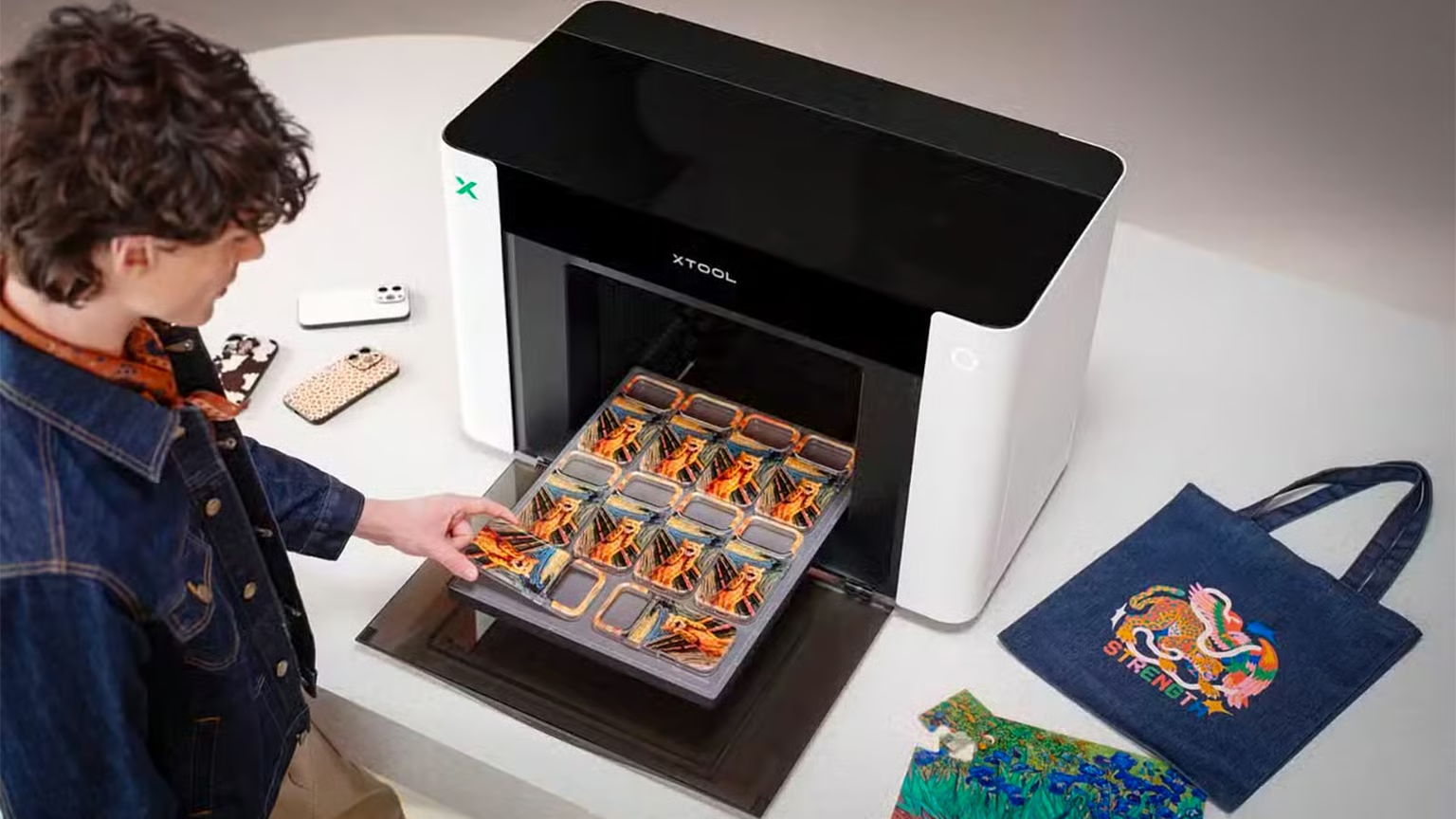
Meta Description: Discover everything about the xTool Omni, the revolutionary multi-surface desktop manufacturing system. Explore its features, printing capabilities, laser engraving, UV printing, AI-powered workflow, applications, pros, cons, specifications, and how it compares with traditional desktop print shops.
xTool Omni: A New Era of Desktop Manufacturing
Desktop manufacturing has changed — dramatically, actually. Gone are the days of juggling separate machines for UV printing, laser engraving, cutting, foil stamping, and embossing. Professionals can now handle nearly every customization task from a single workstation. That’s not a small shift. That’s a fundamental rethink of how small-scale production works.
The xTool Omni pulls several production technologies into one intelligent platform. It’s built for entrepreneurs, small businesses, designers, crafters, makerspaces, and print shops that need professional-quality customization without sinking capital into an industrial-scale facility. Whether you’re producing personalized gifts, promotional merchandise, business products, or custom artwork, the Omni cuts through production complexity while keeping output quality exactly where it needs to be.
What Is the xTool Omni?
At its core, the xTool Omni is an all-in-one desktop manufacturing system — one that processes numerous materials across multiple production technologies simultaneously.
Traditional desktop printers do one thing. The Omni doesn’t think that way. It combines:
- UV Printing
- Laser Engraving
- Laser Cutting
- Digital Foil Application
- Embossing
- Smart Alignment
- AI-assisted Workflow
- Multi-material Positioning
Why does that matter? Because the entire production process happens inside one machine rather than bouncing products between several devices. That alone changes the economics of small-batch customization.
Core Technologies Behind the xTool Omni
| Technology | Purpose |
|---|---|
| UV Printing | Full-color direct printing on rigid surfaces |
| Laser Engraving | Permanent engraving on wood, leather, acrylic, metal and more |
| Laser Cutting | Precision cutting of selected materials |
| Digital Foil | Metallic decorative finishes |
| Embossing | Raised textures for luxury products |
| AI Camera | Automatic positioning and alignment |
| Smart Material Detection | Optimized production settings |
Multi-Surface Printing Capabilities
This is where the Omni genuinely separates itself. It prints directly onto an unusually wide range of materials.
Supported materials include:
- Wood
- Leather
- Acrylic
- Glass
- Stainless Steel
- Aluminum
- Ceramic
- Plastic
- Stone
- Paper
- Cardboard
- Canvas
- Bamboo
- Cork
That kind of flexibility lets businesses diversify their product catalogs without buying a different specialized machine for every substrate. Fewer machines, broader catalog. The math works out.
UV Printing Explained
UV printing cures ink instantly using ultraviolet light. Fast, clean, and durable.
The advantages are real:
- Vibrant colors
- Waterproof prints
- Scratch resistance
- Fade resistance
- High detail reproduction
- Excellent adhesion
- Fast production cycles
Unlike conventional inkjet systems, UV printing doesn’t need absorbent paper. Objects like bottles, phone cases, plaques, notebooks, tumblers, and packaging — all of them can receive full-color graphics directly onto the surface. No transfer paper, no lamination. Just direct, permanent printing.
Laser Engraving Performance
Laser engraving creates permanent markings by removing a microscopic layer of material. Precise. Repeatable. And honestly, the results speak for themselves.
Applications range widely:
- Corporate branding
- Personalized gifts
- Industrial labels
- Decorative artwork
- QR codes
- Serial numbers
- Leather engraving
- Wooden signage
The precision here is exceptional — fine enough for intricate designs and small text that would challenge most desktop engravers.
Laser Cutting Capabilities
Cutting takes the Omni beyond decoration. It’s not just about applying graphics to existing products — creators can actually manufacture components.
Think:
- Wooden ornaments
- Acrylic signs
- Jewelry pieces
- Stencils
- Packaging prototypes
- Educational models
- Craft materials
Clean cut edges reduce finishing work. Dimensional accuracy stays tight throughout. So the components you cut are usable right off the machine, not after thirty minutes of cleanup.
Digital Foil Application
Luxury packaging runs on foil accents. That’s just the reality of premium product presentation right now.
The Omni lets creators apply metallic foil effects without a dedicated hot-foil press sitting in the corner eating up floor space. Popular finishes include:
- Gold
- Silver
- Rose Gold
- Copper
Foil application works beautifully on:
- Invitations
- Certificates
- Premium packaging
- Business cards
- Luxury branding materials
Embossing Features
Embossing adds tactile depth — raised textures that make surfaces feel as premium as they look.
The impact is significant across:
- Premium invitations
- Certificates
- Product packaging
- Brand identity pieces
- Stationery
And when you combine embossing with UV printing? The results look like they came out of commercial printing equipment. That’s the point. That’s what the Omni is designed to deliver.
AI-Powered Smart Camera System
The integrated intelligent camera is one of the more underrated aspects of this machine. Setup time has historically been one of the biggest friction points in small-batch customization — and this system attacks that problem directly.
Capabilities include:
- Automatic object recognition
- Batch positioning
- Surface mapping
- Precise alignment
- Automatic workflow optimization
Manual setup drops dramatically. Repeatability across production runs — especially batch runs — improves meaningfully. For anyone running high-volume custom orders, this alone justifies attention.
Supported Business Applications
The Omni serves a surprisingly wide range of industries. Here’s where it actually gets used.
Gift Businesses
Create personalized:
- Photo frames
- Tumblers
- Pens
- Wallets
- Keychains
- Cutting boards
Corporate Branding
Produce:
- Employee awards
- Promotional products
- Office signage
- Company gifts
- Marketing materials
Print Shops
Offer UV printing, custom engraving, packaging decoration, and product personalization — all without maintaining a fleet of dedicated machines.
Schools and Makerspaces
Ideal for STEM education, engineering projects, product prototyping, and design education. The combination of accessible software and professional-grade output makes it genuinely useful in academic settings.
Artists
Canvas enhancements, mixed-media artwork, acrylic art, wooden artwork, decorative installations — artists working across substrates find the Omni’s material range particularly valuable.
Industries That Benefit Most
- Personalized gift stores
- Etsy sellers
- Print-on-demand businesses
- Trophy manufacturers
- Promotional product companies
- Small print shops
- Packaging companies
- Sign makers
- Educational institutions
- Craft businesses
Production Speed
Integrating multiple manufacturing processes into one machine cuts production time in ways that compound quickly.
The Omni reduces:
- Setup time
- Material handling
- Alignment errors
- Operator intervention
- Production delays
Instead of physically moving products between machines — and realigning everything each time — every stage runs inside a unified workflow. That’s not just convenient. For high-volume operations, it’s genuinely transformative.
Software Integration
The machine supports intuitive software that lets users:
- Import vector graphics
- Import raster images
- Adjust print parameters
- Configure laser settings
- Manage production queues
- Preview layouts
- Run batch processing
The interface works for beginners but doesn’t condescend to experienced professionals. Both ends of the skill spectrum can actually use it effectively — which isn’t as common as it should be in this category.
Key Advantages
Multiple Machines in One
Businesses can replace several standalone devices with a single production platform. The consolidation alone frees up significant capital and space.
Space Saving
A compact footprint makes the Omni viable for:
- Home studios
- Small workshops
- Retail stores
- Educational labs
Reduced Production Costs
Fewer machines mean lower maintenance overhead, lower electricity consumption, reduced training requirements, and a simpler overall workflow.
Professional Quality
Output meets the standards expected of commercial customization businesses. Not “good for a desktop machine.” Actually commercial-grade.
High Versatility
Very few desktop systems offer UV printing, laser engraving, cutting, foiling, and embossing within one platform. That’s not an overstatement — the competitive field here is genuinely thin.
Potential Considerations
The Omni is highly capable. But prospective buyers should think clearly about a few things before purchasing:
- Initial investment cost
- Learning curve for advanced workflows
- Workspace ventilation requirements
- Material compatibility specifics
- Ongoing consumable expenses
Proper training helps extract the machine’s full capabilities. Don’t skip it.
Ideal Users
The xTool Omni fits particularly well for:
- Entrepreneurs launching custom product businesses
- Existing print shops expanding their service offerings
- Creative professionals
- Product designers
- Small manufacturers
- Educational institutions
- Hobbyists who want professional-grade output without professional-facility overhead
Maintenance Requirements
Routine maintenance covers:
- Cleaning optical components
- Inspecting moving parts
- Updating firmware
- Replacing consumables
- Keeping the workspace dust-free
- Maintaining proper ventilation
Consistent upkeep preserves print quality and extends machine life. That’s not optional — it’s the baseline for keeping output standards where they need to be.
Why the xTool Omni Stands Out
The desktop manufacturing market has historically forced buyers into separate investments — a UV printer here, a laser engraver there, a foil machine, an embossing unit. The xTool Omni collapses that equation by pulling those production methods into a single intelligent platform.
The combination of automation, precision, and cross-material versatility lets creators produce professional-grade customized products while trimming workflow complexity and reclaiming valuable workspace. For businesses looking to expand customization capabilities, streamline production, and broaden their product offerings, the Omni is one of the most complete desktop manufacturing solutions on the market right now.
Frequently Asked Questions
Can the xTool Omni print on curved objects?
It supports printing and customization on a wide range of object shapes, though compatibility depends on the object’s specific dimensions and geometry.
Is the xTool Omni suitable for commercial production?
Yes. It’s designed for small businesses, print shops, creators, and professional workshops that need consistent, high-quality customized output.
What materials can the xTool Omni process?
Supported materials include wood, acrylic, leather, glass, ceramics, coated metals, plastics, paper, cardboard, bamboo, cork, and canvas.
Does it support both engraving and full-color printing?
Yes. The system combines laser engraving with UV full-color printing, enabling detailed customization across many surfaces.
Is it beginner-friendly?
The integrated software, smart camera alignment, and automated workflow features reduce setup complexity significantly — making it approachable for beginners. But it still hands experienced users the advanced controls they’d expect. That balance is harder to get right than it sounds.
